
- FortCyber
- Platform
- Phishing campaigns
- FortCyber Awareness
Your security team runs its own phishing campaigns FortCyber Awareness is a SaaS panel for large organisations: campaigns, learning straight after a mistake and measured resilience. We deploy it and support your team.
- email, SMS, links and QR codes
- Entra ID and Microsoft 365 integration
- campaigns and panel in 20 languages
Who runs the campaigns: FortCyber or your team
In both models you test how staff respond, teach after a mistake and see the results. The difference is who works in the panel day to day.
Run by FortCyber
- a FortCyber administrator prepares and launches the campaigns
- you set the scope and dates, and we go through the results with you
- campaigns are part of the Cyber Course and Cyber Academy programmes
- for organisations with no one to run campaigns
Run by your team
- your security team builds templates, launches campaigns and downloads reports
- your own roles, data scopes, campaign domains and integrations
- FortCyber deploys the panel and supports the team from then on
- for large organisations and groups with their own security team
Four campaign channels
Filters stop some attacks. Employees have to recognise the rest, so it is worth practising every channel phishing uses.
Email
Sent from the FortCyber server, your own SMTP server or a Microsoft 365 mailbox. The panel also records attachment downloads and opens.
SMS
A parcel surcharge, a blocked account, a request for a code. An SMS gateway set up for your organisation, templates with a character counter and delivery status.
Links
A campaign without sending. The panel creates a separate link for each person, and you share them by messenger or on the intranet.
QR codes
Codes to print on posters and leaflets, for a person or a group. Scanning a code counts as a click.
Results from all channels are in the same dashboards and reports, so you can compare them.
From template to campaign launch
A catalogue of ready-made messages and landing pages, your own templates and a wizard that guides you through the settings.
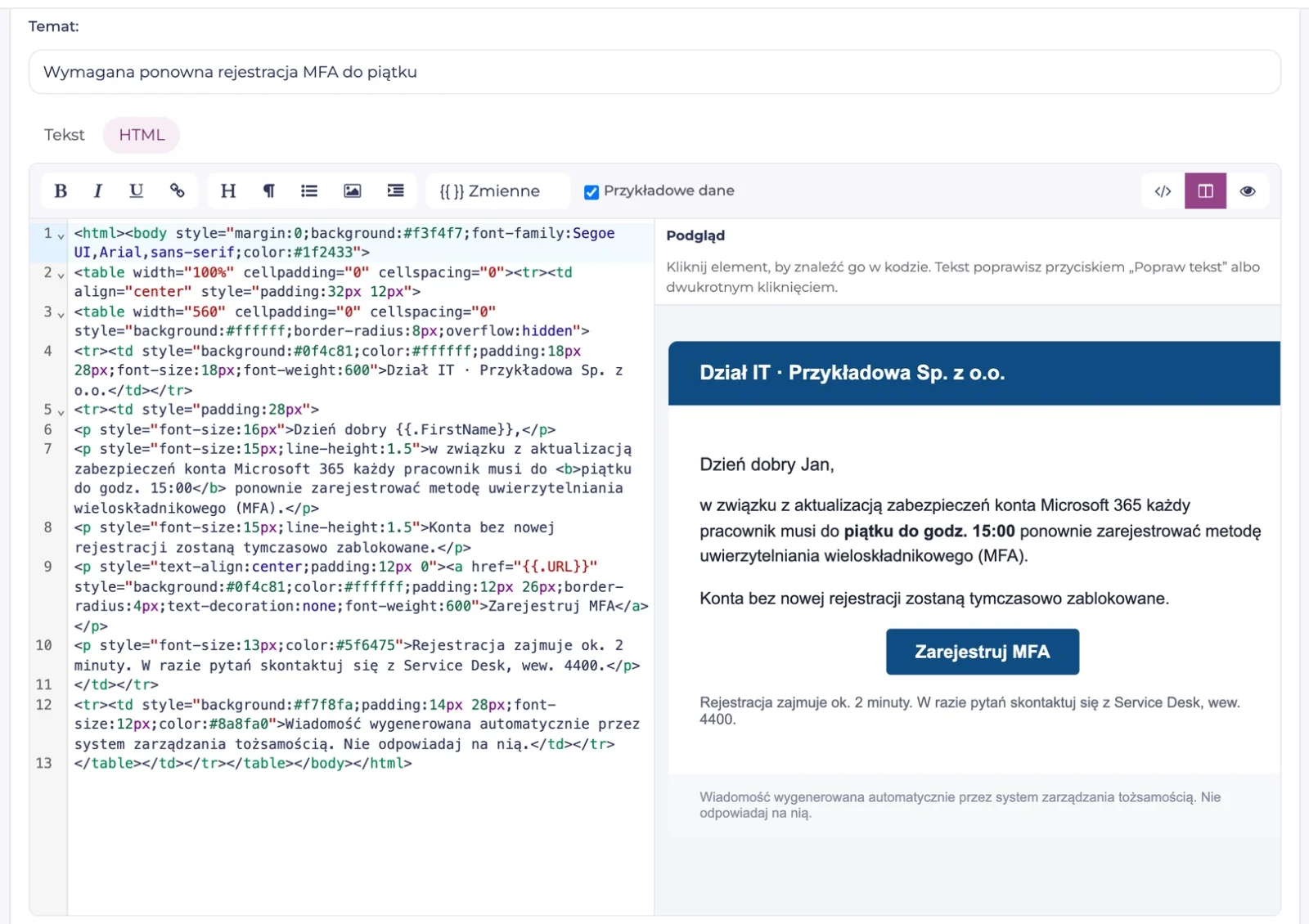
Template editor with preview
- HTML code and message preview side by side
- recipient variables, such as first name and campaign link
- language versions: each recipient gets the message in their own language
- import of your own messages and pages
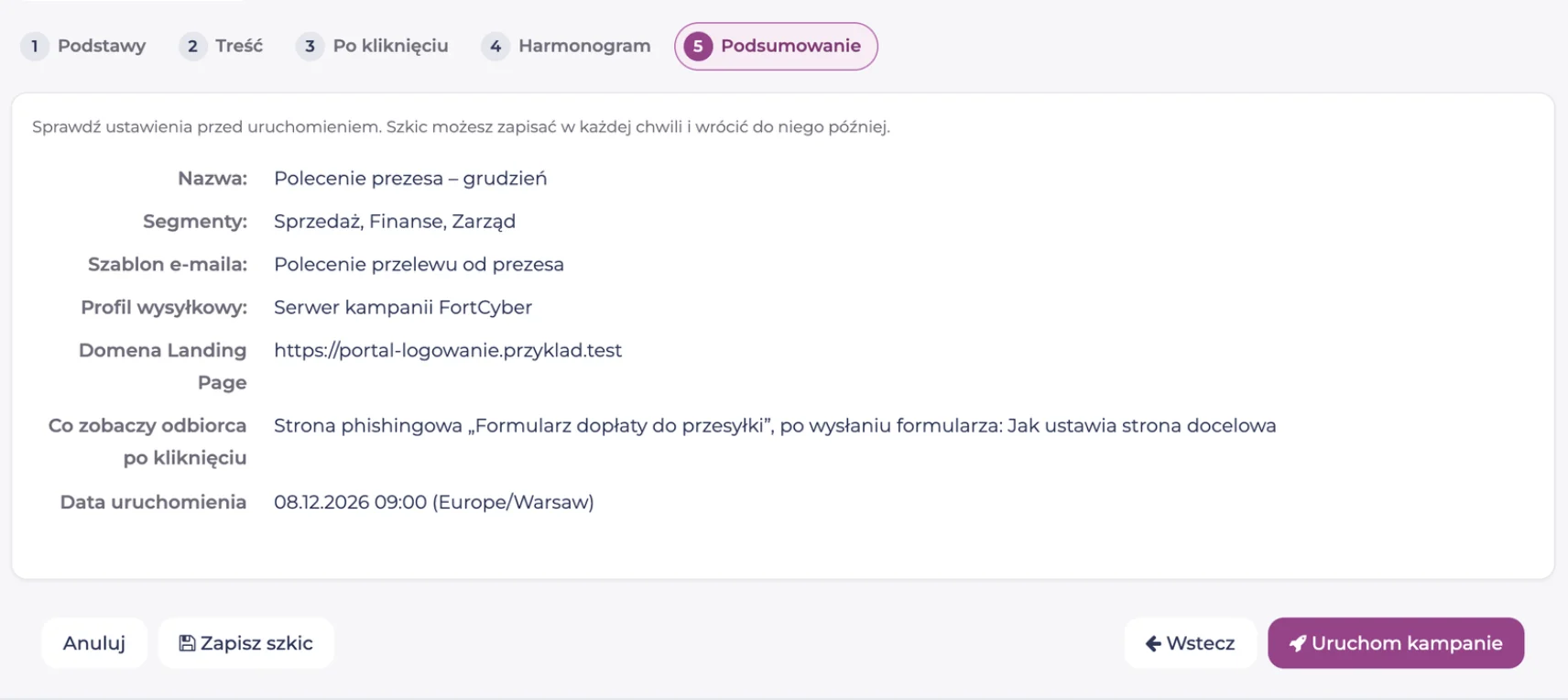
A five-step wizard
- basics, content, after the click, schedule and summary
- the draft can be saved at every step
- a test email before launch
- sending window and days in recipients' time zones, spread over several days
A campaign programme for the whole year
One campaign shows the state on a single day. Regular campaigns show whether the team is making progress.
Recurring campaigns
- monthly, quarterly or at another pace
- the panel varies templates, channels and difficulty
- new employees join automatically after an onboarding period, e.g. after 30 days
- the dashboard shows the gaps between simulations; 30–90 days is recommended
Smart campaigns
- people with a higher risk index get simulations more often
- people who report regularly get them less often
- difficulty rises as the group makes progress
- after data is entered: training, then a follow-up campaign a few weeks later
Recipients and segments
- static, rule-based and behavioural segments, e.g. “click but do not report”
- selection by department, company, location and position
- a campaign covers only people within the data scope of the operator who set it up
Learning starts straight after the mistake
Anyone who clicked the link or entered data sees at once what was suspicious in the message and how to recognise it next time.
- EmployeeClicks or scans
Email, SMS, link or QR code.
- PanelShows an educational page
In the recipient's language, one of 20 versions.
- Training platformAssigns training
Automatically, with reminders.
- SimulatorLets them practise
Before the next follow-up campaign.
Connected to the training platform. Employees, departments and segments reach the panel automatically, and completed training feeds back into the dashboard and the risk index. Training platform
Practice between campaigns. In the simulator, employees recognise threats in realistic examples and get feedback straight away. Threat Simulator
Measuring the organisation's resilience
Every metric has a documented definition, the change from the previous period and the sample size.
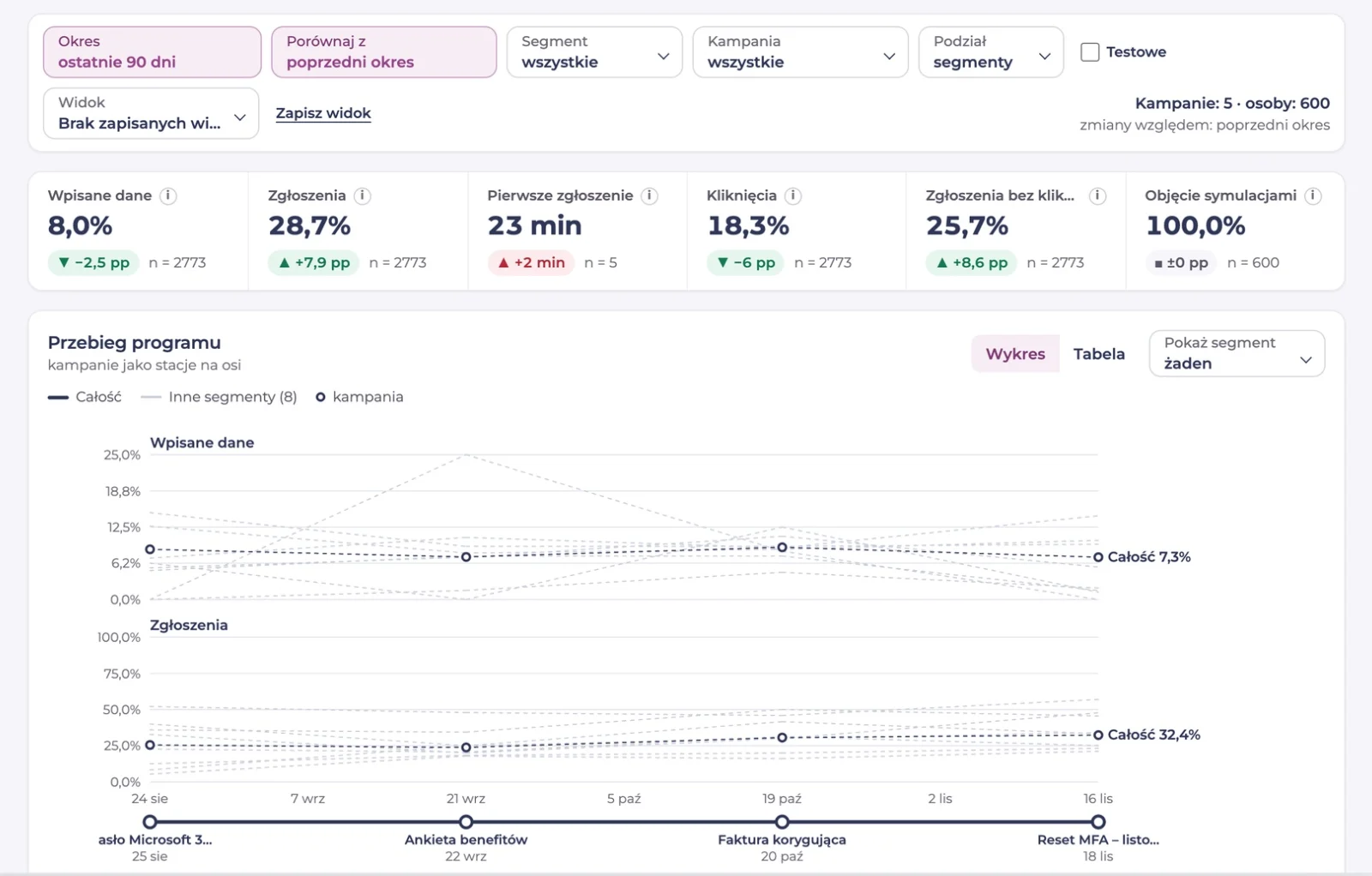
- Separate dashboards
- operational, resilience, board and department; a selected segment against the whole organisation
- Metrics by campaign goal
- credentials, data forms, file downloads and opens, reports and response time
- Template difficulty
- on the NIST Phish Scale; the result is adjusted for difficulty
- Risk index 0–100
- open component weights, confidence of the score and history for segments
- Word, PDF and Excel reports
- seven layouts, including a board summary and an annual programme; your logo, your own templates and scheduled delivery
- Evidence
- reports document awareness activities for ISO/IEC 27001:2022 (A.6.3) and NIS2
For organisations with many companies and branches
You divide access by organisational structure. The data scope applies on screen and in exports, reports and the API.
One workspace
- the whole organisation in one tenant
- data split by department, city, company, position or manager
- each panel user sees only their part
Several workspaces
- a separate tenant for a company, country or brand
- separate data, integrations, campaign domains and report logos
- a tenant has no access to another tenant's data
Delegation
- a delegated administrator manages only their own scope
- custom roles from the permission catalogue, e.g. “Branch coordinator”
- the scope can come with the role from Entra ID or the training platform
Roles and permissions
- Client administrator
- the whole tenant, users, roles and integrations
- Delegated administrator
- the same within their data scope
- Campaign operator
- campaigns, templates, recipients and results
- Analyst
- aggregate results and reports, without personal data
- Analyst with individual results
- individual results too, recorded in the activity log
- Auditor
- activity log and configuration, without results
- Department manager
- their department against the organisation
Integrations with your environment
The panel works with the systems you already use and asks only for the permissions it needs.
Microsoft Entra ID
People and groups synchronised every hour, sign-in with a Microsoft account, MFA and conditional access on the Entra ID side. Read-only permissions: User.Read.All and GroupMember.Read.All.
Microsoft 365 and Exchange Online
The panel supplies the values for Microsoft Defender (Advanced Delivery), so messages do not land in quarantine and Safe Links does not inflate clicks. Reports made with the Outlook button count in the results.
Teams, webhooks and SIEM
Notifications about campaign start, end and the first report, without personal data. HMAC-signed webhooks and activity log forwarding to a SIEM system.
API and BI systems
A fixed data address for Power BI and Excel, JSON, CSV and XLSX formats, an OpenAPI specification. Each key has its own permissions, data scope and expiry date.
Deployment in four steps
We go through the configuration together. After that your team works on its own.
- Step 1Model
One tenant or several, data scopes, roles and report recipients.
- Step 2Integrations
Entra ID, training platform, campaign domains, Advanced Delivery, reporting mailbox and Teams.
- Step 3Baseline campaign
The first measurement: how the organisation responds before the programme starts.
- Step 4Programme
Recurring and smart campaigns, training, the simulator and periodic reports.
Support after launch. Your team runs the campaigns, and FortCyber experts help with configuration, choosing scenarios and working with results. The scope of support is set out in the offer.
Custom quote. We prepare it after a call about the number of employees, the organisation's structure and the integrations you need.
Employee data protection and panel security
The panel is for learning. Access to individual results is restricted and logged.
- No passwords stored
- the panel records that a form was submitted but does not store the passwords entered
- Individual results
- visible only to designated roles; others see group results and trends
- Minimum group size
- groups below the threshold, 5 people by default, go into the “Other” row
- Activity log
- records every export, report, link download and view of a person's results
- Two-step sign-in
- mandatory for selected roles; with Microsoft sign-in it is provided by Entra ID
- Standards
- OWASP Top 10, HTTPS and a strict CSP policy
See the panel on a sample campaign
A demo for the security team, IT and the people responsible for training:
- campaign wizard, templates and dashboards
- roles, data scopes and integrations
- the deployment model for your organisation
The presentation is run by a FortCyber consultant.
Incident in progress? Call +48 699 587 011
We’ll get back to you within one working day.