
Staff practise responding to an attack before they ever face one The simulator recreates a mailbox, fake websites, chat and social media. Here a mistake costs points, not your organisation's data.
- email, websites, files and chat
- scenarios for companies and public bodies
- results and tips straight after the exercise
Attacks come through different channels. The simulator trains each of them
Every exercise is a situation from everyday work. Employees decide what to do themselves, just as with a real message.
Email
A mailbox with several messages, some of them fraud attempts: a fake invoice, an urgent password reset, a manager asking for a quick transfer. Employees mark each message as safe or report it.
Fake websites
A login page or payment portal that looks just like the real one. Employees check the address and the page elements. Entering data ends the exercise, just as a real attack would end.
Attachments and files
A document asking you to enable macros, a file to download from a post on the company network. The exercise teaches when not to open a file and whom to report it to.
Chat and social media
“IT” asks for a login code in a chat, a “system vendor” asks for access, a “director” for an urgent favour. Employees learn to verify identity and say no.
Exercises arranged into a learning path
Scenarios are grouped into stages with a pass mark. The next stage opens once the previous one is passed, and there is a test at the end.
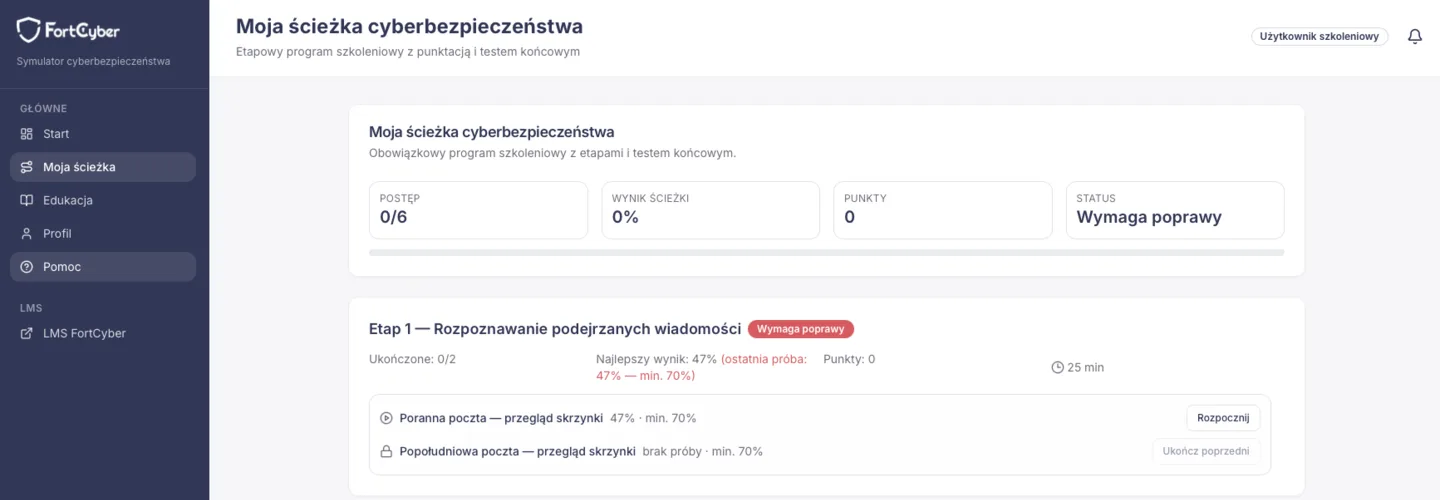
- Path for employees
- email, fake websites, malicious files and social engineering, then a learning module and a final test
- Programme for management
- messages impersonating the board and pressure in conversation, with a final test
- Scoring
- every decision counts separately; reporting a safe message is a false alarm, and entering data on a fake website wipes out the score
- Retakes
- a scenario can be repeated; the path counts the best score
How an exercise works
A dozen or so minutes per scenario. Feedback comes straight away, not a month later in a report.
- EmployeeSigns in
With the same account as on the training platform. For a one-off test, a link and a group password are enough.
- EmployeeAnalyses and decides
Checks the sender, the link and the attachment, then reports, refuses or carries on.
- SimulatorShows what went well
Good decisions, risky actions, warning signs and advice for a real situation.
- SimulatorPicks the next scenarios
Recommended exercises cover the areas where the employee did worst.
Nothing leaves the simulator. Exercises do not send real phishing, and data entered on a fake website is not stored. A banner on the screen reminds users that it is a simulation.
Messages look like they come from your organisation. Scenarios fill in its name, domain, IT contact and known suppliers. There are universal and sector versions, including for healthcare.
What employees see and what the administrator sees
Employees see their own progress; the administrator sees the whole team.
Employee
- path progress and cyber resilience score
- recommended scenarios for weaker areas
- points and badges for good decisions
- learning module: articles, checklists and answers to common questions
Administrator
- assigning scenarios and paths to groups
- team progress and results
- reports and anonymous comparisons within the organisation
- the exercise result in the employee's profile on the training platform
The simulator works together with the training platform: Training platform Cyber Course Cyber Academy
See the simulator on a sample scenario
A demo for HR, IT and the people responsible for training:
- an exercise from the employee's point of view
- paths, scoring and administrator reports
- getting started in your organisation
The presentation is run by a FortCyber consultant.
Incident in progress? Call +48 699 587 011
We’ll get back to you within one working day.